Mastering the Seamless Instagram Carousel: A Guide to Cohesive Visual Storytelling
In the fast-paced world of social media marketing, capturing attention is only half the battle; keeping it is the real challenge. As algorithms evolve and user behaviors shift, static images often fail to convey the depth of a brand’s message. This is where the seamless Instagram carousel emerges as a powerful tool for digital creators and businesses alike. By transforming standard posts into continuous, swipeable narratives, brands can significantly increase engagement, dwell time, and ultimately, conversion rates.
Understanding how to leverage this format effectively requires more than just basic design skills. It demands a strategic approach to visual continuity and content structure. Whether you are launching a new product, running a sale campaign, or simply aiming to enhance your profile’s aesthetic appeal, mastering the seamless carousel can unlock new opportunities for your Instagram account.
What Is a Seamless Instagram Carousel?
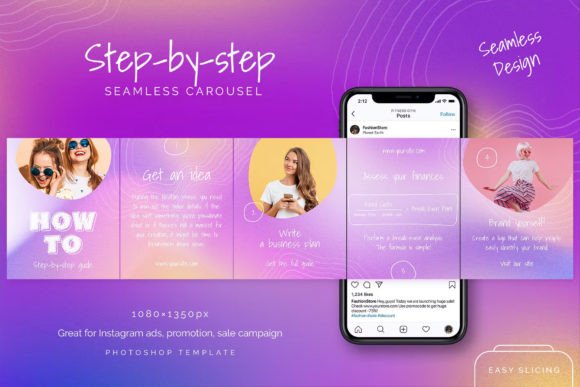
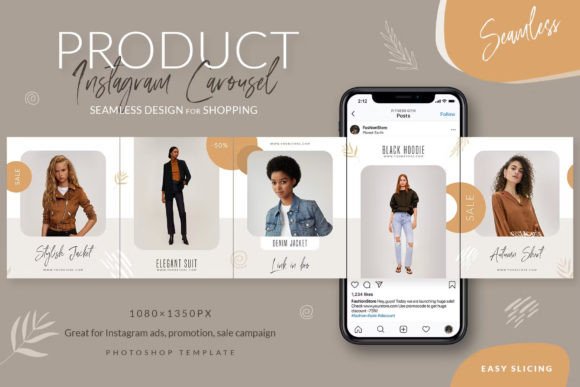
A seamless Instagram carousel, often referred to as a "panoramic post" or "puzzle feed," is a series of images that, when viewed together in a single post, form one continuous visual landscape. Unlike traditional carousels where each slide is a distinct, self-contained image, a seamless design features backgrounds, graphics, or text that flow effortlessly from one slide to the next.
The technical magic lies in the continuity. When a user swipes left, the edge of the first image aligns perfectly with the beginning of the second, creating an illusion of a single, wide canvas. This design technique encourages users to keep swiping to see the full picture, thereby increasing interaction metrics that are crucial for algorithmic visibility.
For businesses, this format is particularly effective because it allows for five ads in one Instagram post. Instead of fragmenting your message across multiple disjointed images, you create a cohesive journey. This is ideal for announcing new products, explaining complex services, or guiding customers through a step-by-step tutorial.
The Psychology Behind the Swipe
Why do seamless carousels work so well? The answer lies in human curiosity and the desire for completion. When a viewer sees a cut-off image or a sentence that continues onto the next slide, their brain seeks closure. This psychological trigger, known as the Zeigarnik effect, compels users to swipe through the entire gallery to resolve the visual tension.
Furthermore, seamless designs reduce cognitive load. Because the visual elements are connected, the viewer processes the content as a single unit rather than five separate entities. This makes it easier to digest information, whether it is a promotional offer or an educational tip.
Practical Applications for Business and Creativity
The versatility of the seamless carousel makes it suitable for various objectives in modern digital marketing. Here are some practical ways to integrate this format into your strategy:
- Product Launches: Use the continuous background to showcase a product from different angles or highlight specific features in a logical sequence.
- Sale Campaigns: Create a sense of urgency by displaying discount codes or limited-time offers that span across multiple slides, ensuring the user sees the entire message.
- Educational Content: Break down complex topics into bite-sized chunks. The seamless flow helps maintain context, making it easier for followers to follow along with tutorials or infographics.
- Brand Storytelling: Use the panoramic effect to tell a visual story that reflects your brand’s identity, values, or behind-the-scenes processes.
By using all five pictures in one post, you maximize the real estate on the user’s screen. Alternatively, if you choose to post them separately, you can achieve a puzzle effect in your Instagram profile grid, creating a visually striking homepage that invites visitors to explore further.
How to Create a Seamless Design
Creating a high-quality seamless carousel does not require advanced coding skills, but it does demand precision in design. The process typically involves using professional graphic design software, such as Adobe Photoshop, to ensure that pixels align perfectly across slides.
Here is a step-by-step overview of how professionals approach this task:
- Start with a Template: Using a pre-made PSD template saves time and ensures accuracy. These templates come with predefined guides and layers for five posts, usually sized at 1080×1350 pixels, which is the optimal vertical dimension for Instagram.
- Design the Background: The key to seamlessness is the background. It must be continuous. Designers often use gradients, patterns, or large photographic elements that stretch across the entire width of the combined slides.
- Add Content Layers: Place your text, logos, and product photos on top of the background. Ensure that critical information is not placed too close to the edges where it might be cut off or obscured by Instagram’s interface elements.
- Edit Easily: With a fully editable PSD file, you can simply type your texts and place your photos. Smart objects in Photoshop allow you to replace images without losing quality or disrupting the layout.
- Export Correctly: Use the "Save for Web" tool to export each slide individually. This ensures that the file size is optimized for fast loading while maintaining high visual quality.
For those who are new to design, many resources offer free fonts and help files included with templates. Additionally, access to free author support can be invaluable when troubleshooting specific design challenges.
Common Misunderstandings
One common misconception is that seamless carousels are only for aesthetically pleasing brands like fashion or travel. In reality, any industry can benefit from this format. B2B companies, educational institutions, and service providers can use seamless designs to present data, case studies, or client testimonials in a more engaging way.
Another assumption is that these designs are difficult to edit. However, modern templates are built with user-friendliness in mind. As long as you have basic familiarity with layer management in Photoshop, you can customize these templates to fit your brand identity quickly.
Maximizing Impact with Strategic Posting
Once your seamless carousel is ready, the next step is distribution. You have two primary options: posting as a single carousel or splitting the images for a grid puzzle.
Option 1: The Single Carousel Post
This is the most common and recommended approach for promotional campaigns. It keeps all the content together, ensuring that every viewer sees the complete narrative. It is particularly effective for Instagram ads, as it allows you to pack more value into a single ad unit. Users can swipe through all five slides, absorbing your message without leaving the post.
Option 2: The Profile Puzzle
If you post the five images separately, they will appear as individual posts on your profile. When arranged correctly, they form a large, cohesive image on your grid. This creates a stunning visual impact for visitors landing on your profile. However, this method has drawbacks: individual posts may lack context when viewed in the feed, and the seamless effect is only visible on the profile grid, not in the main timeline.
For most marketing goals, such as driving sales or announcing new products, the single carousel post is superior. It combines the visual appeal of seamless design with the functional benefit of swipeable interaction.
Why Invest in Professional Templates?
While it is possible to create seamless designs from scratch, investing in a professional Photoshop template offers several advantages. First, it ensures technical precision. Misaligned pixels can break the illusion of seamlessness, making the post look amateurish. Templates are pre-calculated to prevent this.
Second, it saves time. Designing a seamless layout from zero can take hours. With a template, you can produce high-quality content in minutes. This efficiency allows you to focus on strategy and copywriting rather than getting bogged down in technical details.
Finally, professional templates often come with additional perks, such as free author support and comprehensive help files. This support network can be crucial for beginners who are navigating the learning curve of advanced design techniques.
Conclusion
The seamless Instagram carousel is more than just a design trend; it is a strategic asset for modern digital marketing. By combining visual continuity with interactive storytelling, brands can attract lots of customers and deepen their engagement with existing followers. Whether you are looking to sell more with gallery posts or simply want to elevate your profile’s aesthetic, mastering this format is a worthwhile investment.
With the right tools—such as a fully editable PSD template, easy-to-use export methods, and a clear understanding of user behavior—you can launch promo campaigns that stand out in a crowded feed. Embrace the power of seamless design, and watch as your Instagram account transforms into a dynamic platform for growth and connection.